
Word Search Zen
PlaySimple GamesWord
4.91.50K Reviews
- Version
- 1.90.0
- Installs
- 500.00K
- Age Rating
- Everyone
Screenshots
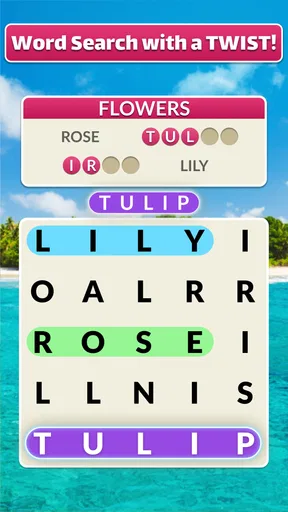
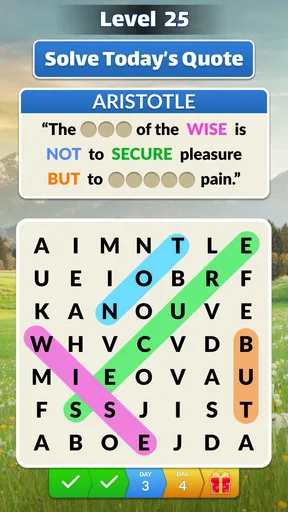


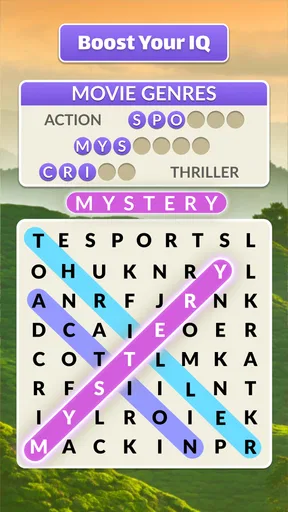
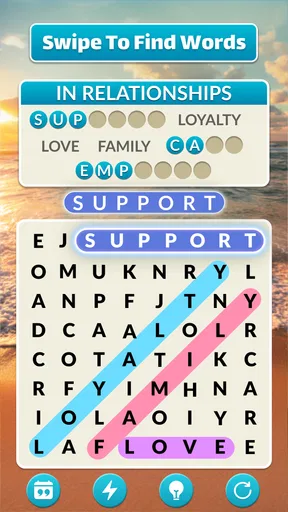

Our Review of Word Search Zen
 Analysis by Appyee
Word Search Zen is the kind of game I reach for when I want something quiet, familiar, and easy to understand immediately. It is a free word game from PlaySimple Games, built around classic word-search puzzles with a travel theme. I do not need to learn a complicated rule set: I scan the letter grid, trace the hidden words, and move on to the next challenge. That simplicity is its biggest strength, especially when I have only a few spare minutes.
After spending time with it, my impression is that the game works best as a relaxed companion rather than as a deep competitive puzzle experience. The travel framing gives the familiar format a little more direction, while the clean objective keeps each round accessible. Its 4.9 average from around 28 thousand ratings and more than 500 thousand installs suggest that this straightforward approach has connected with a sizeable audience. Still, popularity alone does not make every word game a good fit, so I looked closely at how it feels during short sessions, longer play, and everyday use.
How Word Search Zen feels during everyday play
I find the everyday appeal of Word Search Zen comes from how quickly a spare moment can become a focused one: I look over the grid, choose a promising word, and start tracing rather than planning a long session. That makes it a natural fit for waiting or travel, but the same simplicity can make several puzzles in a row feel alike. The next section looks at how the game’s moment-to-moment rhythm shapes that trade-off.
Quick starts and modest expectations for speed
The main advantage of this game is how little preparation it demands. I can open it with a clear idea of what I am supposed to do, rather than spending time arranging a strategy or remembering a complicated set of controls. For a word-search title, that matters: the pleasure comes from spotting patterns, not from navigating menus.
In normal use, I would expect the game to feel light because its central activity is a static letter puzzle rather than a visually demanding action scene. That does not mean every phone will behave identically, but the design itself points toward short, focused interactions. The current version is 1.90.0, and the minimum operating-system requirement is Android 7.0, which makes it approachable for people who are not using a recent flagship device.
The most useful way to judge its speed is by the time between intention and play. If I am waiting for a bus or taking a short break, I want to get into a puzzle quickly, solve a few words, and stop without feeling that I have committed to a long session. Word Search Zen suits that rhythm much better than a large role-playing game or a strategy title that expects me to maintain a campaign.
There is also a practical benefit to the familiar format. Because I already know how word searches work, I spend my attention on the grid itself. That makes the game friendly to occasional players, older users who prefer traditional puzzles, and anyone looking for a calm alternative to fast-moving games. It is also a reasonable choice for a child who enjoys letters, although an adult should still consider the way the child uses any game with optional purchases.
What happens when a short session becomes a long one
Word searches can be deceptively absorbing. I may begin by looking for one or two obvious words and then continue because another shape is almost visible. During heavier use, the pressure is less about reflexes and more about concentration. After several puzzles, the same letter patterns can start to blur together, especially when I am playing on a smaller screen or in poor light.
That is where the game’s relaxing identity becomes a mixed blessing. The lack of frantic action makes it comfortable for extended play, but the basic search loop can also feel repetitive if I want constant novelty. Players who enjoy methodically clearing grids will probably see this as a feature. Players who need changing mechanics, character progression, or a strong competitive layer may find that the calm pace becomes predictable.
My practical tip is to treat it as a sequence of small sessions rather than an endless activity. I get more enjoyment when I stop after a natural puzzle, rest my eyes, and return later. This is especially useful during travel, where a long uninterrupted session on a phone can become tiring even when the game itself is not demanding.
A second useful habit is to change how I scan the board. Instead of searching randomly for every word, I first check unusual letter combinations, then look along the edges, and finally inspect diagonal lines. This is not a special feature, but it makes the game feel less like aimless tapping and more like a repeatable solving workflow. It also helps when a puzzle seems stalled.
Stability, interruptions, and recovering from a pause
For this type of game, reliability is mostly about whether I can return to a puzzle without losing the thread. A word search is naturally easy to understand again after a short interruption, which is a real advantage over games that require remembering a complex battle, route, or objective. If I put the phone away during a commute, I can generally pick up the mental task again without much explanation.
I also like that the basic activity does not depend on fast reactions. A notification, a conversation, or a brief pause is less disruptive when I am examining letters than when I am in the middle of a timed action sequence. That makes it a sensible choice for waiting rooms, quiet evenings, and travel breaks where interruptions are expected.
There is a trade-off, though. The more a game relies on a steady sequence of puzzles, the more frustrating any interruption can feel if progress is not preserved exactly as I expect. I would make sure the app has a moment to register my progress before closing it, particularly on an older phone that may remove background apps aggressively. That is a general good practice rather than a claim about a specific failure, but it is worth remembering when using any mobile puzzle game in short bursts.
Another point is that a calm game can hide device strain until a longer session. If the phone becomes warm, the battery is already low, or several apps are open, I may notice slower responses even in a simple title. Closing unused apps and keeping the device reasonably charged gives a better experience than blaming the puzzle itself for every delay.
Older phones, storage concerns, and comfortable viewing
The Android 7.0 requirement makes this a more realistic option for people keeping an older handset. That is valuable because word puzzles are often chosen precisely by users who do not want to replace a phone just to play a simple game. Compatibility does not guarantee identical performance on every model, but it lowers the entry barrier compared with games designed only for newer hardware.
Screen size matters more than raw graphical power here. On a compact display, the letters can feel crowded, and repeatedly tracing small paths may become uncomfortable. On a larger phone or tablet, the grid should be easier to inspect, particularly for players who prefer to take their time. I would try the game in portrait and landscape positions if the device allows it, then keep whichever arrangement makes the letter lines easiest to follow.
Resource demands are also connected to how the phone is being used around the game. A device with limited free storage, an aging battery, or many background tasks may feel less responsive than a newer model. I would not choose Word Search Zen because I expect it to transform an old phone into a perfect gaming device; I would choose it because its puzzle format is a sensible match for modest hardware.
The Everyone content rating makes the game broadly approachable for families. Even so, the presence of optional purchases deserves attention. The listed in-app purchase range runs from $0.99 to $99.99 per item, so I would use purchase controls on a shared device, especially if a child can access the game. The game is free to install, but “free” should not be confused with “without optional spending.” That distinction is important for anyone handing a phone to another family member.
How it compares with other word-puzzle choices
Compared with a printed word-search book, this game is more convenient when I am already carrying a phone. I do not need a pen, and I can use it in a waiting line or during a journey. Paper still wins for people who want a screen-free activity, who enjoy writing notes in the margins, or who dislike battery concerns. The digital format is convenient, but it cannot replace the tactile feel of a book.
Compared with crossword games, Word Search Zen asks for less vocabulary recall. Crosswords often reward knowing definitions, wordplay, and spelling from clues; here, the central challenge is visual detection. That makes this game a better fit when I want to relax without feeling tested on knowledge. Someone who wants richer language clues or more demanding deduction should look toward crosswords instead.
Compared with anagrams or spelling games, the experience is slower and more observational. I am not constantly rearranging letters or racing a timer. That makes it more comfortable for a quiet break, but less exciting for players who want pressure and rapid decisions. The right choice depends on whether I want my brain to search, construct, or react.
The travel setting gives the game a sense of movement that a plain collection of unrelated grids might lack. I would not mistake that theme for a full travel simulation, though. The reason to stay is still the word-search loop, so anyone expecting a story-heavy journey or detailed destination exploration should choose a different genre.
Who should play it, and who should skip it?
I would recommend Word Search Zen to people who enjoy traditional word searches, need a low-pressure way to fill spare time, or want a game that can be understood without a tutorial-heavy commitment. It is particularly suitable for commuters, casual players, families sharing a device, and anyone who prefers visual puzzles to reflex-based challenges.
It is also a good match for players who like setting their own pace. I can search carefully instead of rushing, and the format remains understandable when I return after a break. That flexibility is more useful than it sounds: a game that fits around real life is often more likely to become part of a routine than one that demands a quiet hour every time it opens.
I would skip it if I need deep strategic systems, a strong multiplayer rivalry, or dramatic changes from one play session to the next. I would also look elsewhere if I dislike optional purchase prompts or want a completely offline, screen-free experience. A paper puzzle book may be better for the latter, while a crossword or anagram title may provide more linguistic challenge.
Three ways to get more from each puzzle
First, I recommend using the theme as a pacing tool rather than trying to rush through every available puzzle. I can play one location-themed section during a break, then leave the game before the activity turns into visual fatigue. This keeps the travel idea enjoyable and prevents the familiar grid from becoming background noise.
Second, I use a two-pass search. On the first pass, I look for long words and unusual letter clusters without dragging immediately. On the second, I trace the likely paths and check whether I have overlooked diagonal or reversed arrangements. This reduces random gestures and is especially helpful on a small display.
Third, I treat optional purchases as a decision to make only after I know how often I will play. Since the game costs nothing to start but includes individual purchases from less than a dollar to nearly a hundred dollars, I would avoid spending simply because I am stuck in one puzzle. Taking a break, changing the scanning method, or returning later is a better first response for a game designed around relaxed searching.
These habits also answer a common practical question: does the game suit very short sessions? In my view, yes. The puzzle structure makes it easy to play for a few minutes, and the same quality makes it easy to stop. It is less suitable when I want a single, substantial gaming session with a clear sense of dramatic progression.
My performance verdict
Word Search Zen succeeds because it does not overcomplicate a format that already works. Its classic search mechanic, travel-oriented presentation, broad age rating, and compatibility with Android 7.0 make it approachable. PlaySimple Games has positioned it as a gentle word game rather than a demanding technical showcase, and that is the right expectation to bring to it.
From a performance perspective, I see it as a sensible low-intensity choice for everyday phones, provided the device itself is not struggling with battery health, storage, or too many background tasks. The game’s strongest recovery feature is not a flashy system but the fact that its puzzles are easy to understand again after an interruption. That makes it dependable in the situations where I would actually use it: travel, waiting, bedtime wind-downs, and short pauses.
My final recommendation is positive, with a clear condition: install it if you want calm, familiar word searching and appreciate a game that can fit around your schedule. Do not install it expecting a constantly changing challenge, a competitive arena, or a replacement for a serious vocabulary game. For the right player, the best part of Word Search Zen is its low friction: I can open it, focus on a grid, and leave whenever I am ready.
With a 4.9 average, around 1.5 thousand written reviews, and a release date of July 3, 2023, it has established a strong presence without needing to abandon its simple identity. The free starting point makes it easy to try, while the optional spending range means I would keep an eye on purchases. Overall, I would recommend it to a friend who wants a peaceful word-search game for Android, especially when convenience and easy recovery matter more than complexity.
Verdict
Strengths of Word Search Zen
- Relaxing gameplay suitable for short breaks or longer sessions.
- Large word puzzles help improve vocabulary and spelling skills.
- Clean interface makes the game easy for all ages to use.
- Offline play lets you enjoy puzzles without a constant internet connection.
- Gradual difficulty gives beginners and experienced players a comfortable challenge.
Limitations of Word Search Zen
- Some puzzles may feel repetitive after extended play sessions.
- Hints can reduce the challenge for players seeking a pure brain workout.
- Small text may be difficult to read on compact phone screens.
- Progression may feel slow for players who prefer fast-paced games.
- Advertising can interrupt the otherwise calm and relaxing experience.
Other Releases by PlaySimple Games
View All


Similar Picks in This Category
View All
Word Search - Word Puzzle Game
Bluetile4.8

Word Search Quest - Puzzles
Blackout Lab4.8

CodyCross: Crossword Puzzles
Fanatee, Inc.4.7

Words of Wonders: Crossword
Fugo Games4.9

Wordscapes: Word puzzle game
PeopleFun4.7

Word Search Explorer
PlaySimple Games4.9
Frequently Asked Questions
What is Word Search Zen?
Word Search Zen is a relaxing word puzzle game centered on finding hidden words in letter grids. Instead of focusing only on speed or competition, it combines traditional word-search gameplay with a calm visual style and soothing atmosphere. Players can typically swipe across letters to form words, complete themed puzzles, and enjoy short sessions whenever they want a quiet mental break.
How do you play Word Search Zen?
To play, examine the grid and look for the words listed on the screen. Words may appear horizontally, vertically, diagonally, or in reverse directions, depending on the puzzle design. Once you find one, drag your finger from the first letter to the last. Completing the entire list usually unlocks the next puzzle, while careful observation helps you progress without relying on random guesses.
Is Word Search Zen suitable for beginners and children?
Yes, Word Search Zen is generally accessible to beginners because its core controls are simple and easy to understand. The gradual puzzle structure can help new players become familiar with scanning letter grids without feeling overwhelmed. However, difficulty and vocabulary may vary between levels, so parents should check the game’s content, advertisements, and privacy information before allowing younger children to use it.
Can Word Search Zen be played offline?
Many word-search games allow at least some puzzles to be played without a constant internet connection, but offline availability can depend on the version installed and the developer’s design. An internet connection may still be required for downloading new content, displaying advertisements, synchronizing progress, or using optional online features. It is best to test the app after installation before depending on it during travel.
Is Word Search Zen free to download and does it contain ads or in-app purchases?
Word Search Zen may be available as a free download, but free access does not always mean that every feature is completely unrestricted. Depending on the platform and release, the game may include advertisements, optional purchases, or paid upgrades such as removing ads or unlocking additional content. Before downloading, review the store listing for current pricing, permissions, subscription details, and purchase requirements.
Play our best games!


